Kura Addon Archetype
The Kura Addon Archetype is a Maven Archetype that bootstraps an Eclipse Kura add-on project. A generated project comes with:
- a Maven + bnd build targeting Java 21 and OSGi
- an example bundle using Declarative Services and Metatype annotations (a
ConfigurableComponent, its OCD and its configuration options) - a bill of materials (
-bom) listing the bundles the project releases - unit tests (JUnit 4 + Mockito) and OSGi integration tests run by bnd against an embedded Kura framework
- a template project producing a Debian (
.deb) package
The archetype is developed in the eclipse-kura/kura-archetype repository and is published on Maven Central as org.eclipse.kura:kura-addon-archetype, so no installation step is required: Maven downloads it on first use. It is available since Kura 6.0.0 and its version matches the Kura version it targets: use 6.0.0 to generate an add-on for Kura 6. All the Kura dependencies of the generated project are resolved through the Kura bill of materials, org.eclipse.kura:kura-bom, of the same version.
Note
Snapshot builds of the archetype are published to the Kura snapshots repository. To generate a project with a -SNAPSHOT version of the archetype, declare that repository in your ~/.m2/settings.xml.
Requirements
- JDK 21: the generated project sets
maven.compiler.release=21. - Maven 3.9.x
- git: required to build a generated project, the
git-commit-id-maven-pluginreads the commit hash that goes into the Debian package version.
Generating a project
In interactive mode, Maven prompts for every property:
mvn archetype:generate \
  -DarchetypeGroupId=org.eclipse.kura \
  -DarchetypeArtifactId=kura-addon-archetype \
  -DarchetypeVersion=<kura-version>
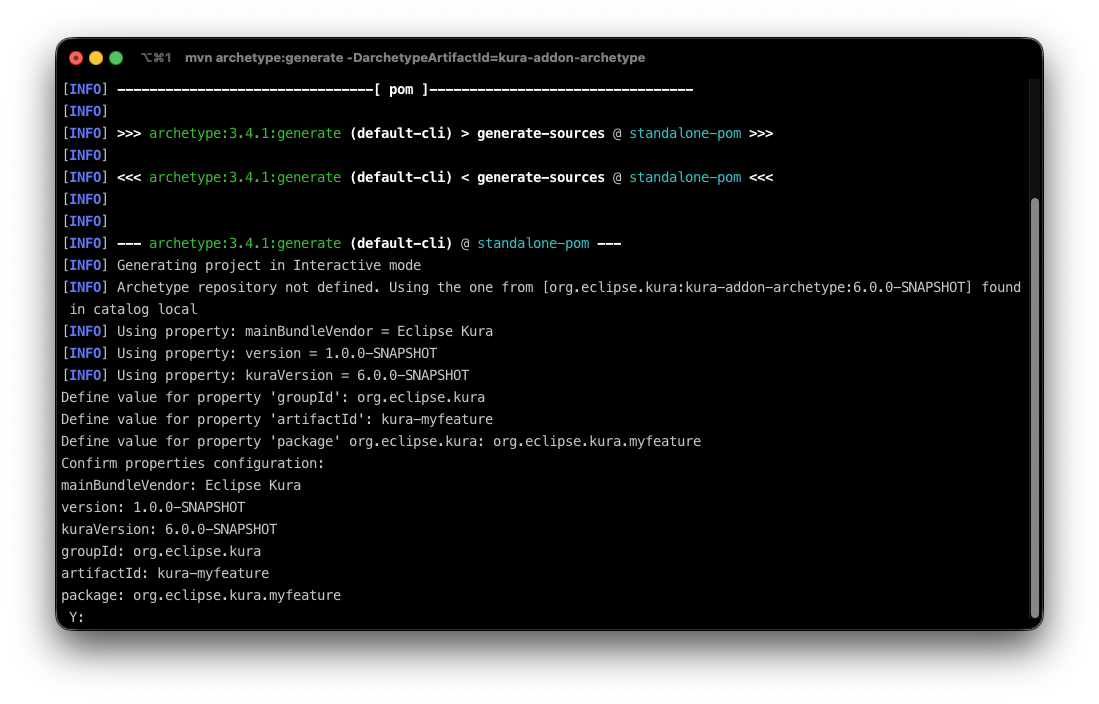
The same result can be obtained in one shot:
mvn -B archetype:generate \
  -DarchetypeGroupId=org.eclipse.kura \
  -DarchetypeArtifactId=kura-addon-archetype \
  -DarchetypeVersion=<kura-version> \
  -DgroupId=org.eclipse.kura \
  -DartifactId=kura-myfeature \
  -Dpackage=org.eclipse.kura.myfeature \
  -Dversion=1.0.0-SNAPSHOT \
  -DmainBundleVendor="Eclipse Kura" \
  -DkuraVersion=<kura-version> \
  -Dyear=2026
| Property | Meaning | Default |
|---|---|---|
groupId |
Maven group id of every generated module | prompted |
artifactId |
artifact id of the root project and name of the top level folder | prompted |
package |
base Java package and artifact id / OSGi symbolic name of the main bundle | prompted |
version |
version of the generated project | 1.0.0-SNAPSHOT |
mainBundleVendor |
vendor name of the add-on | Eclipse Kura |
kuraVersion |
version of the Kura bill of materials (org.eclipse.kura:kura-bom) used to resolve the dependencies |
the archetype version |
year |
year written in the copyright headers of the generated files | the year the archetype was built |
In interactive mode the optional properties can be changed by answering n at the Confirm properties configuration prompt. The prompt also shows archetypeVersion, which never needs to be set: it defaults to the version of the archetype in use and is recorded as a comment in the generated root pom.xml, so a project always states what generated it.
The official Kura add-ons naming rule is:
- groupId =
org.eclipse.kura - artifactId = repository name:
kura-<feature>(e.g.kura-wires) - package =
org.eclipse.kura.<feature>(e.g.org.eclipse.kura.wires)
It is not allowed to generate a project with artifactId = package: the root project and the main bundle are separate Maven modules.
The generated files carry the following copyright header, where ${year} is the value of the year property:
Copyright (c) ${year} Eurotech and/or its affiliates and others

This program and the accompanying materials are made
available under the terms of the Eclipse Public License 2.0
which is available at https://www.eclipse.org/legal/epl-2.0/

SPDX-License-Identifier: EPL-2.0

Contributors:
 Eurotech
A .gitignore file is added with a default configuration that ignores, among others, the OSGI-INF folder and the flattened POMs, which are generated at build time.
Add the generated sources to git
The project requires source control management via git to correctly build. To add the project to git run the following:
Once this steps are completed you can safely build the project.
Project structure
At the end of the procedure, the generated project is organized as follows:
kura-myfeature
├── .gitignore
├── pom.xml
├── bom
│   └── pom.xml
├── org.eclipse.kura.myfeature
│   ├── pom.xml
│   ├── about.html
│   ├── about_files
│   └── src/main/java
├── distrib
│   ├── deb/control/control
│   └── pom.xml
└── tests
    ├── pom.xml
    ├── test-env
    └── org.eclipse.kura.myfeature.test
        ├── integration-test.bndrun
        ├── pom.xml
        ├── src/main/java   (OSGi integration tests)
        └── src/test/java   (unit tests)
-
pom.xml: the root project. It imports the Kura bill of materials (
org.eclipse.kura:kura-bom:${kuraVersion}) in itsdependencyManagementand configures the bnd Maven plugins, the checkstyle validation with the Kura rules and the flatten plugin. -
bom: this project's bill of materials, listing all the bundles that this project deploys. It is intended to be consumed by other projects.
-
org.eclipse.kura.myfeature: the OSGi bundle, built by
bnd-maven-plugin. The manifest is generated by bnd from the<bnd>instructions in thepom.xmland from the Declarative Services and Metatype annotations in the sources, so there is noMANIFEST.MFnorOSGI-INFfolder to maintain. -
tests: the tests aggregator. Its
pom.xmldeclares the Kura runtime bundles indexed for the OSGi integration tests,test-envcontains the Kura framework configuration used by the integration tests (kura.properties,log4j.xml, the initial snapshot) and the.testmodule contains unit tests, run bymaven-surefire-plugin, and OSGi integration tests, run bybnd-testing-maven-plugin. -
distrib: a packaging project that builds a Debian (
.deb) package. The package installs the JAR produced by the bundles into Kura's plugins directory at/opt/eclipse/kura/plugins. You should review and adjust this project to match your target architecture and packaging requirements; the source is annotated with comments indicating the main configuration points.
Dependencies
The Kura bill of materials manages the versions of every Kura bundle and of every third-party library that is part of the Kura runtime (OSGi, Equinox, Jetty, Jersey, log4j, BouncyCastle, Netty, ...). A dependency on any of them is declared without a version in the bundle pom.xml:
<dependency>
    <groupId>org.eclipse.kura</groupId>
    <artifactId>org.eclipse.kura.api</artifactId>
</dependency>
Using the versions managed by kura-bom guarantees that the bundle is compiled against the same packages that are available in the Kura runtime it targets. When upgrading the add-on to a new Kura version it is enough to change the kura-bom version imported in the root pom.xml.
Dependencies that are not part of the Kura runtime must be added, with a version, to the dependencyManagement of the root pom.xml. Remember that such libraries also need to be installed in the Kura framework at runtime, for example by packaging them in the Debian package.
Project build
The first build must run the resolve-integration-tests profile:
The -runbundles of the generated integration-test.bndrun are not populated: the profile enables the bnd-resolver-maven-plugin, which computes the set of bundles needed by the integration tests from the -runrequires of the .bndrun and writes it back in the file. After the first build a plain mvn clean install is enough.
Run the profile again whenever the -runrequires of the .bndrun or the imports of the bundles change. We suggest adding the resolved .bndrun files to the source control to have a clear history of the changes made to the test runtime.
The build will produce the following system packages in distrib/target/deb:
- DEB installer (
<package.name>_<version>-<revision>_<debian-architecture>.deb)
Installer properties like the architecture, organization name, package dependencies, and others can be configured in the distrib project.
Tests
Both kinds of tests run as part of mvn verify / mvn install:
- Unit tests:
maven-surefire-pluginruns the classes insrc/test/javaof the.testmodule. Reports land intests/<package>.test/target/surefire-reports/. - OSGi integration tests:
bnd-testing-maven-pluginstarts an Equinox framework with the Kura emulator bundles listed in the-runbundlesofintegration-test.bndrun, installs the bundle under test and the test bundle, and runs the test classes selected byTest-Cases: ${classes;CONCRETE;PUBLIC;NAMED;*Test}. Test classes live insrc/main/javaof the.testmodule, since they are part of the test bundle. The framework works in a copy oftests/test-envcreated intests/<package>.test/target/test-envbefore the run. Reports land intests/<package>.test/target/test-reports/integration-test/.
JaCoCo writes an aggregate coverage report to tests/<package>.test/target/site/jacoco-aggregate/.
The bnd resolver only includes in the runtime the bundles that are required, directly or transitively, by the .bndrun. The generated integration-test.bndrun requires:
- the Kura emulator runtime (
-runrequires.emulator): configuration, crypto, identity, inventory, status and system services, the emulator bundles, the H2 database, the cloud connection with the embedded Moquette broker, and the HTTP and REST stack - the bundle under test and the test bundle itself (
-runrequires). The symbolic name of the bundle under test comes from thebundle.under.testproperty of the.testmodulepom.xml.
To make another Kura bundle available to the integration tests, add it to -runrequires and run the resolve-integration-tests profile again. The bundles that the resolver can pick from are the dependencies of tests/pom.xml, which are indexed by bnd-indexer-maven-plugin: the generated list mirrors the full Kura runtime, so it normally does not need changes. A bundle that is not part of the Kura runtime must be added there too, with its version managed in the root pom.xml.
Note
The example integration test, ExampleComponentItTest, is itself a Declarative Services component: it obtains the component under test through an @Reference filtered on its kura.service.pid and waits for it before running the tests. This is the recommended way to obtain Kura services in integration tests.
Install and run the generated packages
Depending on the system, the packages can be installed with:
The package depends on kura-core version 6: the control file declares Depends: kura-core (>= 6.0.0~), kura-core (<< 7.0.0~).
After having installed the package, restart Kura with:
During startup Kura will scan the plugins folder to pick up the installed JARs and include them in the framework's runtime. The bundles are installed in the 6s folder, i.e. at OSGi start level 6 and started automatically. See the comments in distrib/pom.xml to use other start levels.
It is possible to remove the installed plugins with:
Debug builds and Release builds
Two type of builds are supported:
- Debug builds: active by default, generate artifacts whose version is computed from the timestamp and the
gitcommit hash. Versioning scheme:X.X.X~git{timestamp}.{hash}-{revision} - Release builds: generate release-ready artifacts. This build requires that no artifact/version is in "snapshot" mode. A "snapshot" version will result in a build failure. Versioning scheme:
X.X.X-{revision}.
The build defaults to the debugBuild profile, if the -DreleaseBuild parameter is specified, the build selects the releaseBuild profile.
By default the package.revision is set to 1. It can be overridden via CLI using the -Dpackage.revision=N parameters.
Example:
Versions uptick
Using the following command it is possible to update the version of the project:
The BOM project and the bundles defined in the dependency management section are updated as well. The OSGi Bundle-Version is derived by bnd from the Maven version, so no manifest needs to be edited.
Deploy artifacts
By default the root project, the tests and the distrib modules are not deployed (they are configured to skip the execution of the maven-deploy-plugin). Only the BOM (bom/pom.xml) and the OSGi bundles are meant to be deployed: the generated bundle re-enables the maven-deploy-plugin, use it as a reference for any bundle added to the project.
IDE setup
No specific IDE configuration is required to work with the generated projects. The project can be imported in any IDE that supports Maven projects, such as Visual Studio Code, IntelliJ Idea and Eclipse IDE.
Importing Projects in Visual Studio Code
To import the project in Visual Studio Code, open the root folder of the project. Refer to the VSCode documentation for more details on how to work with Java projects in VSCode.
Suggested extensions:
Importing Projects in IntelliJ Idea
To import the project in IntelliJ Idea, open the root folder of the project and select the pom.xml file. Refer to the IntelliJ documentation for more details on how to work with Maven projects in IntelliJ.
Importing Projects in Eclipse IDE
In Eclipse IDE, create a new workspace (it is not necessary to have the workspace in the root of the project) and import the projects with File | Import | Maven | Existing Maven Projects.
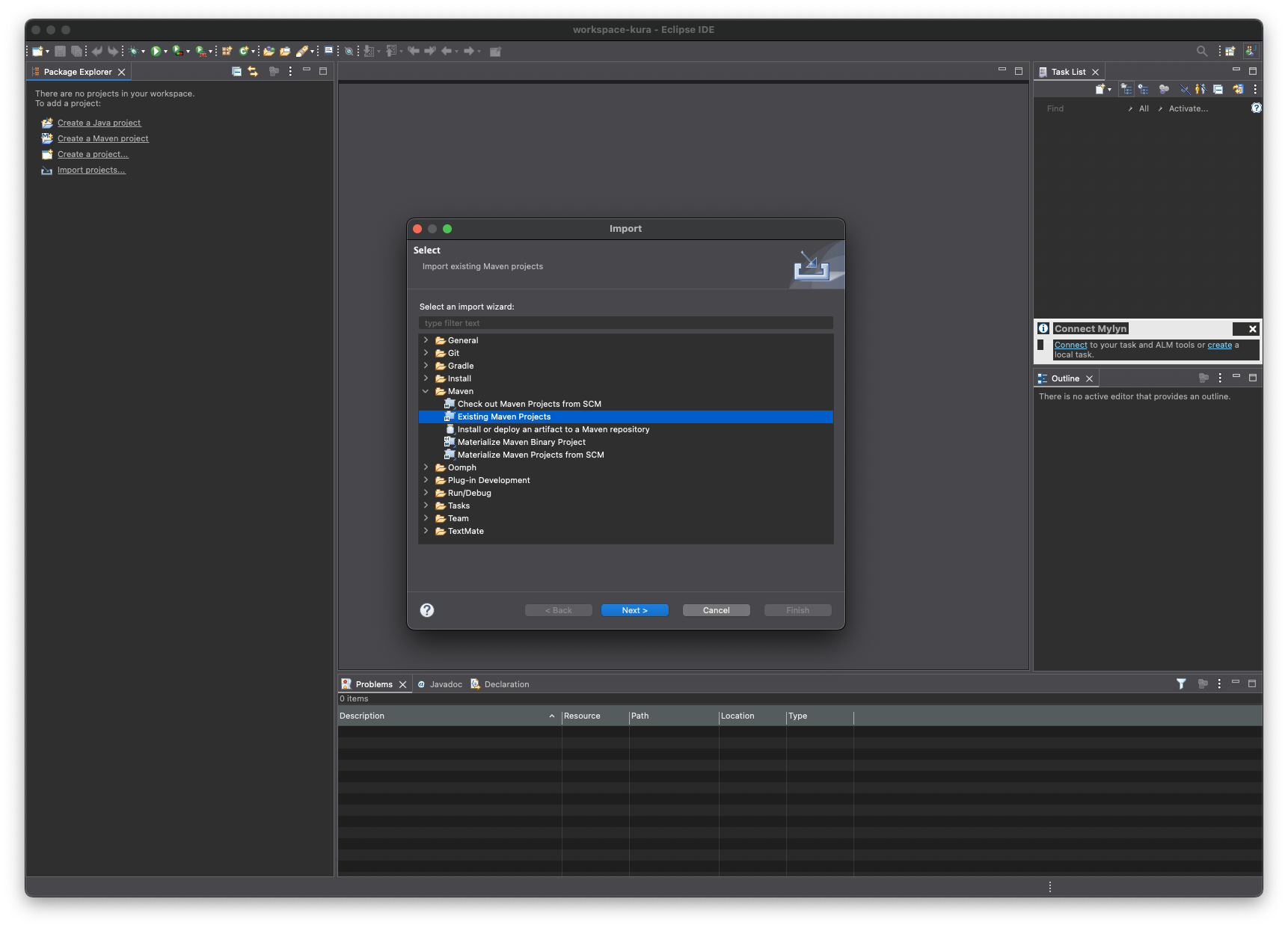
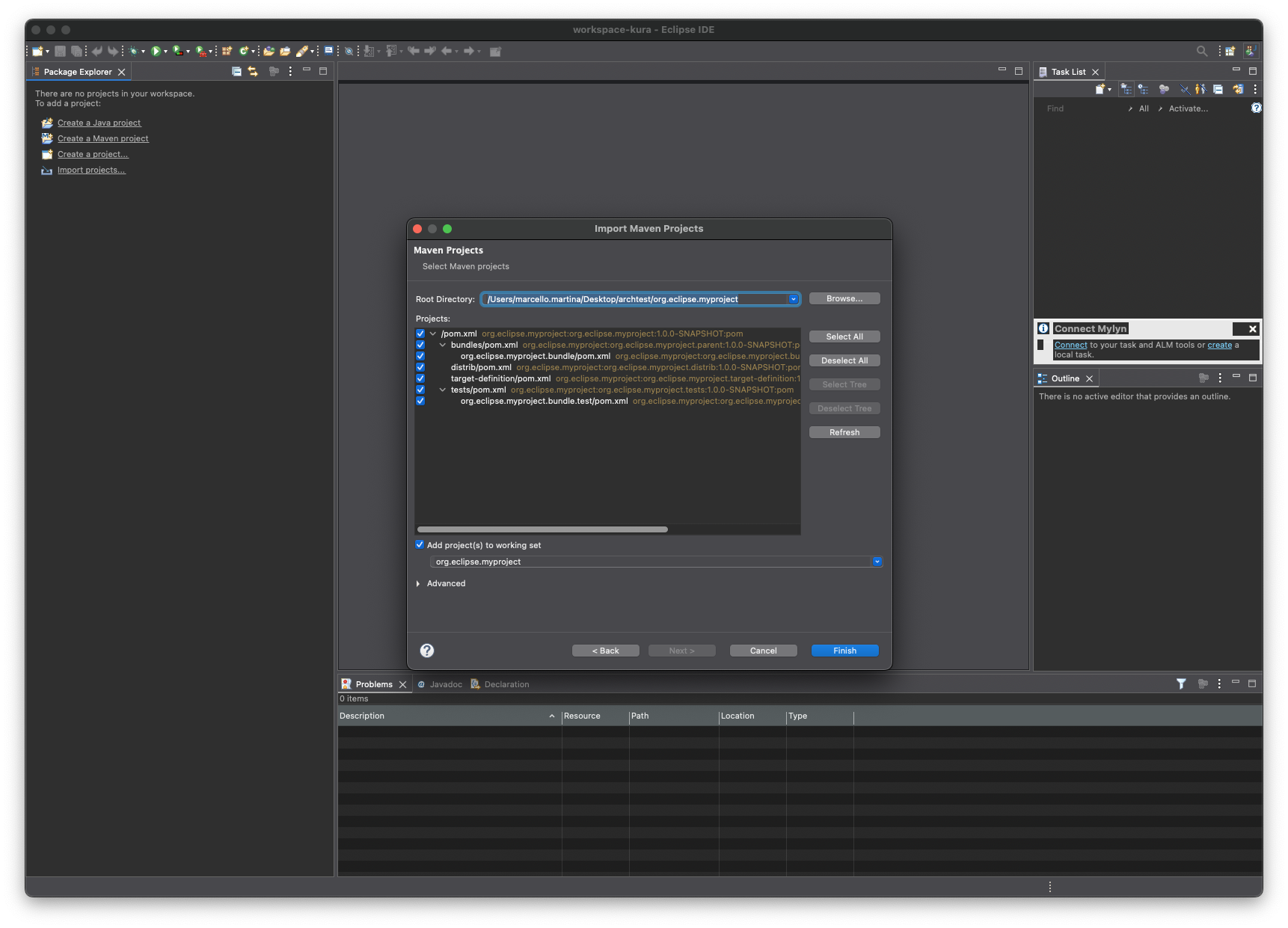
Note that if the workspace resides in the root of the project the parent POM file cannot be selected.
(Optional) IDE errors resolution
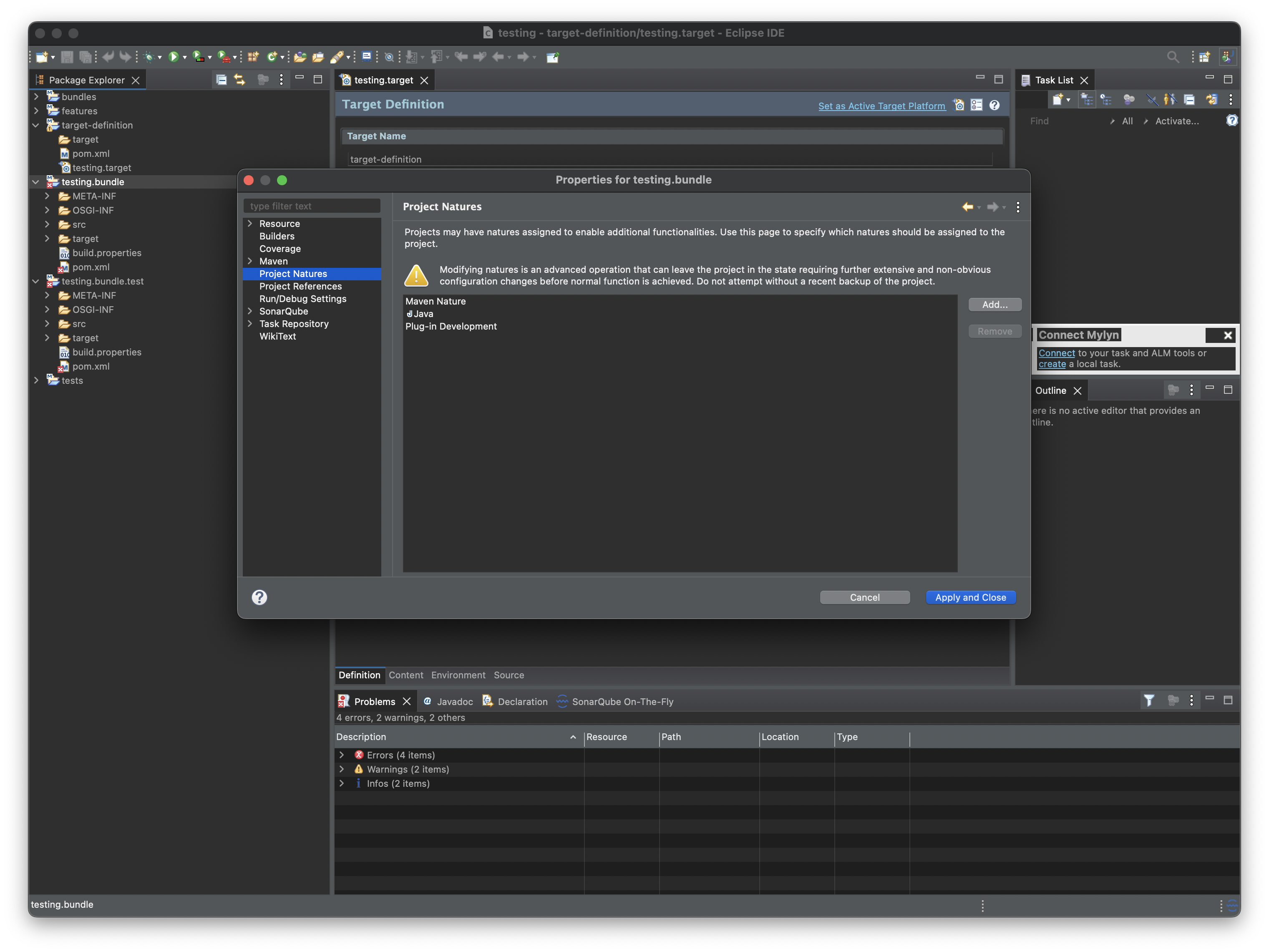
In some cases it might be necessary to manually configure the build path. For the bundles and test projects, select Properties and then Project Natures and add the natures as in picture below.
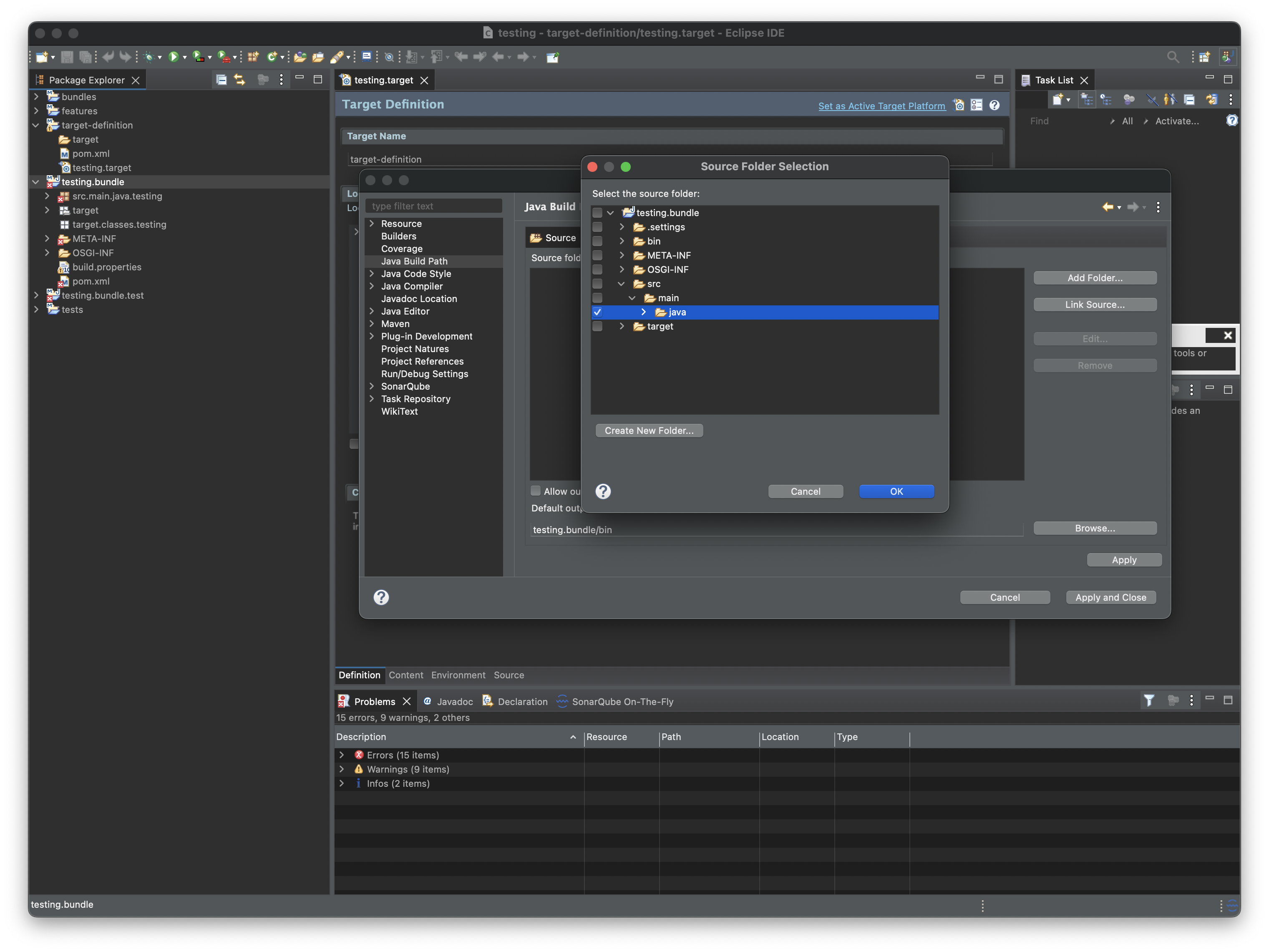
Then, from the Java Build Path configure the correct source folder as in picture below.
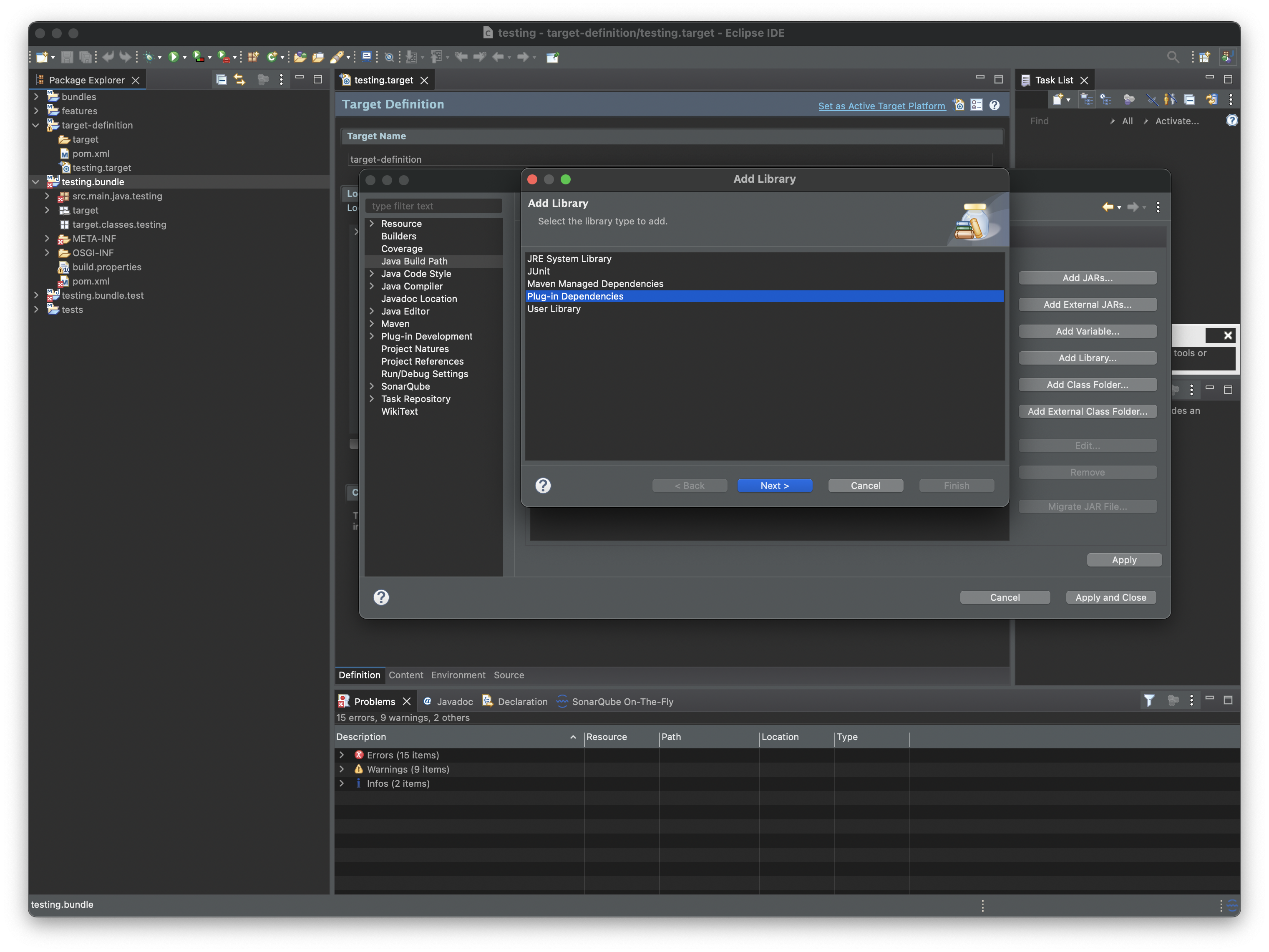
Finally, configure the external Classpath dependencies by selecting the plugin dependencies from the Add Library.
Architecture-specific development
The Addon Archetype standard procedure allows to build generic Debian installers not dependant on the architecture on which the bundle will be installed.
However, it is possible to customise the files in the distrib folder to develop architecture-dependant installers: this might be necessary when a bundle contains native code (C/C++ libraries, jars that use JNI, etc.) or architecture-specific files (e.g. a systemd service file).
In the following sections we will see how this can be accomplished for the DEB packages. These steps assume that architecture-specific jars are built in the form of fragments of the architecture-agnostic java code. The architecture-specific jars will then be copied in the distrib folder and included in the package. For example, given the following bundles structure:
org.eclipse.kura.myartifact
org.eclipse.kura.myartifact.aarch64
org.eclipse.kura.myartifact.x86_64
....
The org.eclipse.kura.myartifact.bundle contains the agnostic code, while the org.eclipse.kura.myartifact.aarch64 and org.eclipse.kura.myartifact.x86_64 fragments contain the architecture-specific code.
The objective is to produce two debian packages, one for each of the supported architectures. It is possible to modify the pom.xml in distrib to produce the correct metadata for the installers (see section below). Each debian package will install the main bundle and the relative fragment that matches the target environment. For example, the aarch64 deb package will install:
/opt/eclipse/kura/plugins/<start-level>s/org.eclipse.kura.myartifact-<version>.jar
/opt/eclipse/kura/plugins/<start-level>/org.eclipse.kura.myartifact.aarch64-<version>.jar
Note that the fragment org.eclipse.kura.myartifact.aarch64-<version>.jar is put in a plugins folder that is not ending with s since fragments can never be started as they don't have their own lifecycle.
Create architecture dependant installers
The /distrib/deb/control/control file contains the DEB package metadata. The standard file is configured as follows:
Package: [[package.name]]
Version: [[package.version]]-[[package.revision]]
Section: admin
Priority: optional
Depends: kura-core (>= 6.0.0~), kura-core (<< 7.0.0~)
Architecture: [[deb.architecture]]
Maintainer: [[deb.maintainer]]
Description: [[summary]]
  [[long.description]]
Homepage: [[deb.docs]]
The Architecture field is the one responsible to specify the architecture of the package. The value is set in the /distrib/pom.xml file, by the property <deb.architecture>all</deb.architecture>. The value all means that the package can be installed on any architecture. This is the recommended value for packages that do not contain architecture-specific files.
To build a package that contains architecture-specific files, it is necessary to separate the control files of the different architectures (namely, aarch64 and amd64). To do so, create two directories in the distrib/deb/ folder with this structure:
control file must be created in the distrib/deb/<arch>/ folder. These folders can also contain the postinst and postrm files, used to execute commands after the installation and before the removal of the package. The content of these files is not relevant for this example, but they can be used to execute commands that are necessary for the correct installation of the package.
An example of control file for the arm64 architecture is:
Package: [[package.name]]
Version: [[package.version]]-[[package.revision]]
Section: admin
Priority: optional
Depends: kura-core (>= 6.0.0~), kura-core (<< 7.0.0~)
Architecture: [[deb.arm64.architecture]]
Maintainer: [[deb.maintainer]]
Description: [[summary]]
  [[long.description]]
Homepage: [[deb.docs]]
The same file for the amd64 architecture will just change the Architecture field to [[deb.amd64.architecture]].
Finally, the plugin responsible of generating the DEB package is the jdeb plugin. To build the architecture-dependant installers, the execution must change to:
<execution>
    <id>generate-arm64-deb</id>
    <phase>package</phase>
    <goals>
        <goal>jdeb</goal>
    </goals>
    <configuration>
        <verbose>true</verbose>
        <deb>${basedir}/target/deb/${package.name}_${package.version}-${package.revision}_${deb.arm64.architecture}.deb</deb>
        <controlDir>${project.basedir}/deb/arm64</controlDir>
        <skipPOMs>false</skipPOMs>
        <dataSet>
            <data>
                <src>${basedir}/target/plugins/${jar.name}-${project.version}.jar</src>
                <dst>${jar.name}-${project.version}.jar</dst>
                <type>file</type>
                <mapper>
                    <type>perm</type>
                    <prefix>${addon.installation.dir}</prefix>
                    <user>kurad</user>
                    <group>kurad</group>
                    <filemode>600</filemode>
                </mapper>
            </data>
            <data>
                <src>${basedir}/target/plugins/${jar.aarch64.core}-${project.version}.jar</src>
                <dst>${jar.aarch64.core}-${project.version}.jar</dst>
                <type>file</type>
                <mapper>
                    <type>perm</type>
                    <prefix>${native.core.installation.dir}</prefix>
                    <user>kurad</user>
                    <group>kurad</group>
                    <filemode>600</filemode>
                </mapper>
            </data>
        </dataSet>
    </configuration>
</execution>
The jar.name, jar.aarch64.core and native.core.installation.dir properties used above are not part of the generated project: define them in the distrib/pom.xml properties to match your bundle names and installation folders. A similar execution can be used for the amd64 architecture, just changing the deb and controlDir fields to point to the correct architecture (and change the execution id if they're present at the same time). Also in the <dataSet> section, the src and dst fields must be changed to point to the correct architecture-specific jars.
The final result will consist of two installers, one for each architecture. They will be found in the distrib/target/deb/ folder with the following names: